



Finding a reliable place to download movies in Nigeria doesn’t have to be difficult. Some of the best options in 2026 include NolliStream, Netflix, Prime Video, DStv Streaming, Showmine, YouTube, Plex, and other authorised streaming platforms. For Nollywood lovers, NolliStream is particularly worth considering, while Netflix and Prime Video offer a broader selection of Nigerian and international movies. Some platforms also allow users to download selected titles and watch them offline.
The best option for you depends on what you want to watch, whether you prefer Nollywood movies, international films, free content, or a service that supports offline viewing.
Below is a breakdown of some of the platforms worth checking out.
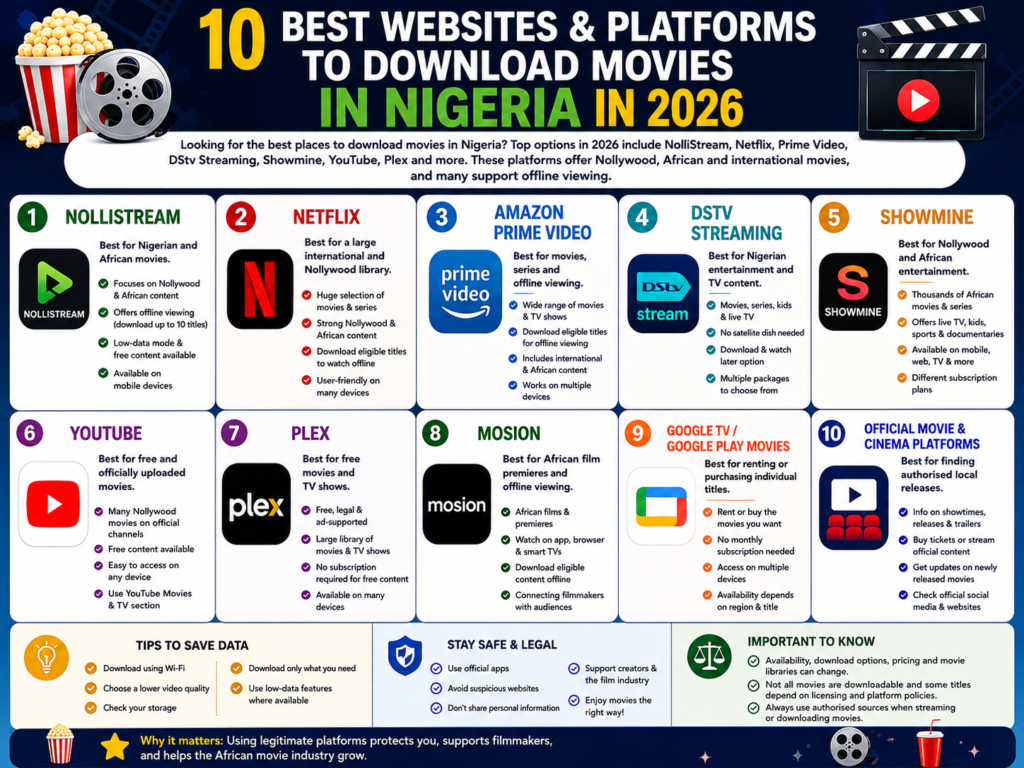
Best Websites and Platforms to Download Movies in Nigeria
Here are some of the options to consider:
- NolliStream – Best for Nigerian and African movies
- Netflix – Best for a large international and Nollywood library
- Amazon Prime Video – Best for movies, series and offline viewing
- DStv Streaming – Best for Nigerian entertainment and TV content
- Showmine – Best for Nollywood and African entertainment
- YouTube – Best for free and officially uploaded movies
- Plex – Best for free movies and TV shows
- Mosion – Best for African film premieres and offline viewing
- Google TV / Google Play Movies – Best for purchasing or renting individual titles
- Official broadcaster and cinema platforms – Best for finding authorised local releases
Important: Availability, download options, pricing and movie libraries can change depending on the platform, location and licensing agreements. Always use authorised sources when downloading or streaming copyrighted movies.
1. NolliStream
NolliStream is one of the newer platforms worth checking out if you’re specifically looking for Nigerian and African movies.
The Nigerian streaming platform launched in 2026 with a focus on Nollywood and African entertainment. It offers movies, television programmes and other content, with an offline viewing feature designed to help users who may deal with expensive data or inconsistent internet connections.
NolliStream’s app also includes features such as personalised recommendations, watchlists, parental controls and a low-data mode. Its Google Play listing says users can download up to 10 titles for offline viewing.
How to use NolliStream
- Download the NolliStream app from an official app store.
- Open the app and create or access your account.
- Browse through the available movies and shows.
- Select the movie you want to watch.
- If the title supports offline viewing, select the download option.
- Access your downloaded content from the app when you want to watch offline.
Why choose NolliStream?
- Focuses heavily on Nollywood and African content.
- Offers offline viewing.
- Includes a low-data mode.
- Available on mobile devices.
- Provides free access to a selection of content.
NolliStream is particularly useful for viewers who want Nigerian and African entertainment without relying entirely on constant streaming.
2. Netflix
Netflix is one of the strongest options for people who want both Nollywood and international movies in one place.
The platform has a large catalogue covering movies, series, documentaries and African productions. It also offers offline downloads for selected titles through its supported mobile and compatible apps.
Not every movie or series is downloadable, as availability depends on licensing and other content-rights restrictions.
How to download movies on Netflix
- Install the Netflix app on a compatible device.
- Sign in to your account.
- Search for the movie you want.
- Check whether the title has a download option.
- Select the download icon.
- Open the Downloads section when you want to watch it offline.
Why choose Netflix?
- Large selection of international movies.
- Strong Nollywood and African content selection.
- Offline downloads for eligible titles.
- Multiple genres and categories.
- User-friendly interface.
If you already have a Netflix subscription, its offline download feature can be particularly useful when travelling or trying to reduce mobile data usage.
3. Amazon Prime Video
Amazon Prime Video is another good option for Nigerians who want access to international movies, TV shows and selected African content.
The service allows users to download eligible movies and TV shows through its supported apps for offline viewing.
For movies, users can open the title’s details page and select the download option. TV shows can also be downloaded by season or individual episode.
How to download movies on Prime Video
- Install the Prime Video app.
- Sign in to your account.
- Search for a movie.
- Open the movie’s details page.
- Select Download if the title is eligible.
- Find the movie in your downloads and watch it offline.
Why choose Prime Video?
- Wide selection of movies and TV shows.
- Supports offline viewing.
- Available across supported devices.
- Includes international and African content.
- Suitable for people who enjoy both movies and series.
4. DStv Streaming
DStv Streaming is another option for Nigerian viewers who want movies, TV shows and other entertainment without needing a satellite decoder.
DStv says its streaming service works through an internet connection and supports compatible smartphones, smart TVs and other devices. It also provides a download-and-watch-later option through the DStv App.
How to use DStv Streaming
- Select an available DStv streaming package.
- Create your account.
- Complete the payment process.
- Sign in through the DStv App or supported browser.
- Browse the available movies and shows.
- Download eligible content if you want to watch it later.
Why choose DStv Streaming?
- Access to movies and TV programmes.
- No satellite dish required for streaming.
- Supports offline viewing for selected content.
- Works across compatible devices.
- Offers several subscription packages.
5. Showmine
Showmine is a Nigerian streaming platform focused on African movies, series and entertainment.
The service says it offers thousands of African movies and series alongside live TV, children’s content, sports and documentaries.
Showmine is available through its website and mobile application, allowing users to watch across phones, tablets, laptops, desktops and TVs.
How to use Showmine
- Visit the Showmine platform or download its app.
- Create an account.
- Choose an available subscription plan.
- Browse the movie library.
- Select the movie you want to watch.
- Stream it on a supported device.
Why choose Showmine?
- Focuses on African entertainment.
- Offers Nollywood movies and series.
- Includes live TV and documentaries.
- Supports multiple devices.
- Provides different subscription plans.
6. YouTube
YouTube is one of the easiest places to find free movies, particularly when you use official channels and authorised uploads.
There are Nigerian film producers, distributors and entertainment channels that publish full Nollywood movies on the platform. You can search for a specific movie or browse official channels for available titles.
YouTube also has a dedicated Movies & TV section where users can explore available film content.
How to find Nigerian movies on YouTube
- Open YouTube.
- Search for the movie title or terms such as “Nigerian full movie.”
- Check that the movie has been uploaded by an official or authorised channel.
- Open the video and begin watching.
- Use YouTube’s available offline features where supported by your account and region.
Why choose YouTube?
- Easy to access.
- Large amount of entertainment content.
- Many Nigerian creators and film channels.
- Some movies are available for free.
- Works across many devices.
However, be careful with unofficial uploads. A movie appearing on YouTube does not automatically mean that the uploader has permission to distribute it.
7. Plex
Plex is a useful option for people looking for free, legal movies and TV shows online.
The platform offers free, ad-supported movies and television content without requiring a paid subscription for its free catalogue. Plex says its free service is supported by advertising and is available across a wide range of internet-connected devices.
How to use Plex
- Visit Plex or install the Plex app.
- Browse its free movie and TV catalogue.
- Select a movie.
- Start watching on a supported device.
Why choose Plex?
- Free legal streaming.
- No subscription required for its free catalogue.
- Large selection of movies and TV shows.
- Available on multiple devices.
- Supported by advertisements.
Plex is a good choice if your priority is free legal streaming, although its catalogue and availability can vary by region.
8. Mosion
Mosion is an emerging platform focused on African film premieres and digital cinema experiences.
The platform allows viewers to watch films through its app, supported browsers and compatible smart TVs. It also offers offline viewing through its mobile application for eligible content.
Mosion is currently in an open-beta stage, so its catalogue and features may continue to change as the platform develops.
How to use Mosion
- Visit the Mosion website or download the app.
- Browse the available films.
- Select a movie or premiere.
- Purchase or access the title where required.
- Watch through the supported platform.
- Download eligible content through the app for offline viewing.
Why choose Mosion?
- Focuses on African films.
- Supports mobile and browser viewing.
- Offers offline viewing.
- Provides access to film premieres.
- Connects filmmakers with audiences.
9. Google TV
Google TV can be useful if you want to rent or purchase individual movies instead of subscribing to another streaming service.
Rather than paying for an entire streaming catalogue, users can look for individual movies available for rental or purchase through Google’s movie ecosystem where supported.
The major advantage is that you can pay for the specific movie you want rather than maintaining another monthly subscription.
How it works
- Open Google TV or the supported Google movie service.
- Search for the movie.
- Check whether it is available to rent or purchase.
- Select your preferred option.
- Complete the payment.
- Access the movie through your library and supported offline options.
Availability can vary by country and by title, so check what is offered in Nigeria before purchasing.
10. Official Movie and Cinema Platforms
Official movie distributors, cinema companies and broadcasters can also be useful when looking for newly released Nigerian films.
These platforms may provide movie information, trailers, cinema schedules, digital releases or links to authorised viewing services.
This is particularly useful when a movie has only recently left cinemas and has not yet appeared on major streaming platforms.
Instead of searching random websites for a newly released movie, check the movie’s official social media pages, production company, distributor or cinema platform to find out where it has been legally released.
How Do I Download Movies to Watch Offline?
The easiest and safest way to download movies for offline viewing is through a legitimate streaming or digital movie service that provides an official download feature.
The exact process depends on the platform, but it usually follows these steps:
Step 1: Choose a legitimate platform
Use a service such as Netflix, Prime Video, DStv Streaming or another authorised platform that offers offline viewing.
Step 2: Install the official app
Download the platform’s official application from your device’s trusted app store.
Step 3: Sign in
Open the app and sign into your account. Some platforms require an active subscription or payment before downloads are available.
Step 4: Find your movie
Search for the movie you want to watch.
Step 5: Check for the download option
Look for a download icon. If it is missing, the movie may not be available for offline viewing.
Step 6: Download the movie
Select the download option and wait for the movie to finish downloading.
Step 7: Watch offline
Once the download is complete, go to the platform’s Downloads or offline section and watch the movie without needing to stream it again.
For example, Netflix allows eligible movies and shows to be downloaded through its app, although some titles cannot be downloaded because of licensing or other restrictions.
Prime Video similarly provides an official download function for eligible movies and TV shows through supported apps.
Can I Download Movies for Free?
Yes, but free does not always mean that a website is authorised to distribute the movie.
Some legitimate platforms offer free, ad-supported content. Plex, for example, provides free legal movies and TV shows supported by advertisements. YouTube also has free movies and Nigerian film content, although viewers should verify that uploads come from authorised channels.
Other platforms may require a subscription, rental payment or individual purchase.
Before downloading a movie from a free website, check whether the platform has the right to distribute the movie. This helps you avoid copyright problems as well as potentially unsafe websites.
Are Movie Download Websites Safe?
Not every movie download website is safe. A website offering a movie for free does not automatically mean it is trustworthy or legally authorised.
Be careful with websites that:
- Ask you to install unknown software before downloading.
- Open multiple suspicious pop-ups.
- Redirect you to unrelated websites.
- Ask for unnecessary personal information.
- Offer newly released movies without any clear licensing information.
- Ask you to disable your browser’s security features.
- Provide suspicious APK or executable downloads.
For safer movie downloads, use official apps and recognised streaming services whenever possible.
How to Save Data When Downloading Movies
Downloading a movie can consume a significant amount of data, particularly when you choose HD or Full HD quality.
To reduce your data usage:
Download using Wi-Fi
If possible, download movies while connected to Wi-Fi instead of mobile data.
Choose a lower video quality
If your main goal is offline viewing rather than maximum resolution, a lower-quality download can save both data and storage space.
Check your storage
HD movies can take up a lot of space. Delete movies you have already watched to free up storage.
Download only what you need
Avoid downloading several large movies at once if you have limited storage or data.
Use low-data features where available
Some platforms provide settings designed to reduce data consumption. NolliStream, for example, advertises a low-data mode designed for users who want to reduce the amount of data required for streaming.
Frequently Asked Questions
What is the best website to download Nigerian movies?
There is no single best platform for everyone. NolliStream is a strong option for Nigerian and African movies, while Netflix and Prime Video are better suited to viewers who want a wider mix of Nollywood and international content.
Where can I download Nollywood movies?
You can find Nollywood movies on platforms such as NolliStream, Netflix, Prime Video, Showmine and authorised YouTube channels. Availability varies depending on the movie and licensing agreements.
Can I watch movies offline in Nigeria?
Yes. Several legitimate streaming platforms support offline viewing. Netflix, Prime Video and DStv Streaming, for example, provide download features for eligible content.
Conclusion
Finding a good platform to download or watch movies in Nigeria is easier when you know where to look. NolliStream is a notable option for Nollywood and African content, while Netflix and Prime Video provide broader international libraries. DStv Streaming, Showmine, YouTube, Plex and other authorised platforms provide additional ways to access movies and entertainment.
If offline viewing is your priority, look specifically for platforms with an official download feature. If you’re trying to save money, free and ad-supported options such as Plex or authorised free YouTube uploads may be worth exploring.
Most importantly, use legitimate platforms whenever possible.
